Unicode Text Rendering Example
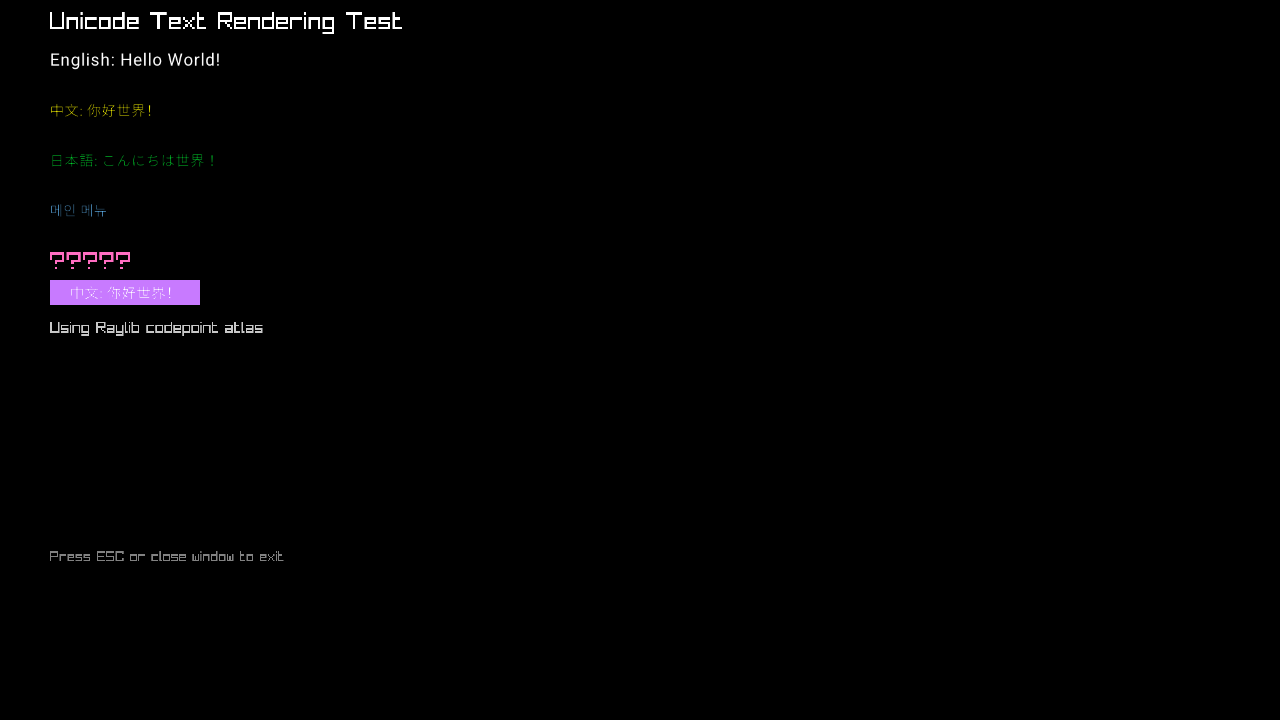
This example demonstrates comprehensive Unicode text rendering support in the PopcorningGuineaPig Engine. It showcases multi-language text display using various Unicode scripts including Latin, CJK (Chinese, Japanese, Korean), and emoji characters with proper font loading and rendering.
Overview
The Unicode Test example is located in examples/unicode-test/ and demonstrates:
- Multi-Script Support: English, Chinese, Japanese, Korean text rendering
- Emoji Rendering: Color emoji support using NotoColorEmoji font
- Font Loading: Advanced Unicode font loading with extended character ranges
- Text Rendering: UTF-8 text from a Raylib font atlas built from the codepoints in the strings
- Font Management: Managing multiple font files for different scripts
- UI Integration: Unicode text in both labels and interactive buttons
Key Features
1. Multi-Language Text Display
Comprehensive support for various writing systems:
// English text with Latin font
englishLabel = new Label("English: Hello World!",
    new Vector2(50, 50), 20, Color.White, latinFontPath);

// Chinese text with CJK font
chineseLabel = new Label("中文: 你好世界!",
    new Vector2(50, 100), 20, Color.Yellow, chineseFontPath);

// Japanese text with appropriate font
japaneseLabel = new Label("日本語: こんにちは世界!",
    new Vector2(50, 150), 20, Color.Green, japaneseFontPath);

// Korean text
koreanLabel = new Label("메인 메뉴",
    new Vector2(50, 200), 20, Color.SkyBlue, koreanFontPath);

// Emoji support
emojiLabel = new Label("🌍🎮🚀⭐🎨",
    new Vector2(50, 250), 24, Color.Pink, emojiFontPath);
2. Font Management System
Organized font loading for different writing systems:
public override void Load()
{
    string baseFontPath = Directory.GetCurrentDirectory();

    // Define font paths for different scripts
    string latinFontPath = baseFontPath + "/assets/Roboto-Regular.ttf";
    string emojiFontPath = baseFontPath + "/assets/NotoEmoji-Regular.ttf";
    string chineseFontPath = baseFontPath + "/assets/NotoSansSC-VariableFont_wght.ttf";
    string japaneseFontPath = baseFontPath + "/assets/NotoSansJP-VariableFont_wght.ttf";
    string koreanFontPath = baseFontPath + "/assets/NotoSansKR-VariableFont_wght.ttf";

    // Create labels with script-appropriate fonts
    englishLabel = new Label("English: Hello World!", new Vector2(50, 50), 20, Color.White, latinFontPath);
    chineseLabel = new Label("中文: 你好世界!", new Vector2(50, 100), 20, Color.Yellow, chineseFontPath);
    // ... additional labels
}
3. Advanced Unicode Font Loading
Comprehensive Unicode character range support:
private Font LoadFontWithUnicodeSupport(string path)
{
    if (!File.Exists(path))
    {
        Console.WriteLine($"Font file not found: {path}");
        return Raylib.GetFontDefault();
    }

    try
    {
        int fontSize = 32; // Larger size for better glyph quality

        unsafe
        {
            // Calculate total codepoints needed
            int totalCodepoints =
                (0x7E - 0x20 + 1) +           // ASCII
                (0x9FFF - 0x4E00 + 1) +       // Chinese CJK
                (0x309F - 0x3040 + 1) +       // Japanese Hiragana
                (0x30FF - 0x30A0 + 1) +       // Japanese Katakana
                (0xD7AF - 0xAC00 + 1);        // Korean Hangul

            int[] codepoints = new int[totalCodepoints];
            int index = 0;

            // ASCII range (0x20-0x7E)
            for (int i = 0x20; i <= 0x7E; i++)
                codepoints[index++] = i;

            // Chinese range (0x4E00-0x9FFF) - Common CJK
            for (int i = 0x4E00; i <= 0x9FFF; i++)
                codepoints[index++] = i;

            // Japanese Hiragana (0x3040-0x309F)
            for (int i = 0x3040; i <= 0x309F; i++)
                codepoints[index++] = i;

            // Japanese Katakana (0x30A0-0x30FF)
            for (int i = 0x30A0; i <= 0x30FF; i++)
                codepoints[index++] = i;

            // Korean Hangul (0xAC00-0xD7AF)
            for (int i = 0xAC00; i <= 0xD7AF; i++)
                codepoints[index++] = i;

            // Load font with Unicode ranges
            byte[] pathBytes = Encoding.UTF8.GetBytes(path + '\0');

            fixed (int* codepointsPtr = codepoints)
            fixed (byte* pathPtr = pathBytes)
            {
                var font = Raylib.LoadFontEx((sbyte*)pathPtr, fontSize, codepointsPtr, codepoints.Length);
                Console.WriteLine($"Successfully loaded font with Unicode support: {path}");
                return font;
            }
        }
    }
    catch (Exception ex)
    {
        Console.WriteLine($"Error loading font '{path}': {ex.Message}");
        return Raylib.GetFontDefault();
    }
}
4. Interactive Unicode UI Elements
Unicode text in interactive components:
// Create button with Chinese text using loaded font
var chineseFont = LoadFontWithUnicodeSupport(chineseFontPath);
chineseButton = new Button("中文: 你好世界!",
    new Vector2(50, 280),
    new Vector2(150, 25),
    Color.Purple,
    chineseFont);
5. Codepoint atlas
Labels call FontCodepoints.AddText with the string they draw. LoadFontEx bakes that set, and DrawTextEx draws it. A character that was never added draws as ?.
public override void Render()
{
    // Title using built-in rendering
    Raylib.DrawText("Unicode Text Rendering Test", 50, 10, 24, Color.White);
    Raylib.DrawText("Using Raylib codepoint atlas", 50, 320, 16, Color.LightGray);

    englishLabel?.Draw();
    chineseLabel?.Draw();
    japaneseLabel?.Draw();
    koreanLabel?.Draw();
    emojiLabel?.Draw();
    chineseButton.Draw();

    // Instructions
    Raylib.DrawText("Press ESC or close window to exit", 50, 550, 14, Color.Gray);
}
Font Files and Unicode Coverage
Included Fonts
The example includes several high-quality fonts for comprehensive Unicode support:
- Roboto-Regular.ttf: Western languages (Latin, Cyrillic, Greek)
- NotoSansSC-VariableFont_wght.ttf: Simplified Chinese
- NotoSansJP-VariableFont_wght.ttf: Japanese (Hiragana, Katakana, Kanji)
- NotoSansKR-VariableFont_wght.ttf: Korean (Hangul)
- NotoEmoji-Regular.ttf: Color emoji support
- NotoColorEmoji-Regular.ttf: Enhanced color emoji
Unicode Ranges Supported
| Script | Range | Description |
|---|---|---|
| ASCII | U+0020-U+007E | Basic Latin characters |
| CJK Unified | U+4E00-U+9FFF | Common Chinese characters |
| Hiragana | U+3040-U+309F | Japanese phonetic script |
| Katakana | U+30A0-U+30FF | Japanese phonetic script |
| Hangul | U+AC00-U+D7AF | Korean syllabic script |
| Emoji | Various | Unicode emoji characters |
Running the Example
Prerequisites
- .NET 10.0 or later
- PopcorningGuineaPig.Engine reference
- Raylib-cs package
Build and Run
cd examples/unicode-test
dotnet build
dotnet run
Project Structure
unicode-test/
├── UnicodeTest.csproj       # Project file
├── Program.cs               # Entry point
├── UnicodeTest.cs           # Main game implementation
└── assets/
    ├── Roboto-Regular.ttf                    # Western languages
    ├── NotoEmoji-Regular.ttf                 # Monochrome emoji
    ├── NotoColorEmoji-Regular.ttf            # Color emoji
    ├── NotoSansSC-VariableFont_wght.ttf      # Simplified Chinese
    ├── NotoSansJP-VariableFont_wght.ttf      # Japanese
    └── NotoSansKR-VariableFont_wght.ttf      # Korean
What You'll Learn
- Unicode Fundamentals: Understanding character encoding and Unicode ranges
- Font Loading: Advanced font loading with custom character ranges
- Multi-Script Support: Handling different writing systems in one application
- Text Rendering: UTF-8 text from a Raylib codepoint atlas
- Font Management: Organizing fonts for different languages
- Memory Management: Proper cleanup of font resources
- UI Internationalization: Creating multilingual user interfaces
Technical Details
Character Range Calculations
Understanding how Unicode ranges are structured:
// ASCII printable characters (95 characters)
int asciiCount = 0x7E - 0x20 + 1;  // 95

// CJK Unified Ideographs (20,992 characters)
int cjkCount = 0x9FFF - 0x4E00 + 1;  // 20992

// Japanese Hiragana (96 characters)
int hiraganaCount = 0x309F - 0x3040 + 1;  // 96

// Japanese Katakana (96 characters)
int katakanaCount = 0x30FF - 0x30A0 + 1;  // 96

// Korean Hangul Syllables (11,172 characters)
int hangulCount = 0xD7AF - 0xAC00 + 1;  // 11172

// Total: 32,451 characters
Memory Considerations
Large Unicode fonts require significant memory:
// Estimate: 32,451 characters × 32px font × ~4 bytes per pixel
// Approximate memory usage: ~4MB per font
Console.WriteLine($"Loading font with {codepoints.Length} characters");
Performance Optimization
Techniques for efficient Unicode text rendering:
- Font Caching: Load fonts once and reuse
- Selective Loading: Only load needed character ranges
- Texture Atlasing: Combine character textures efficiently
- Lazy Loading: Load fonts on-demand
Example Output
When you run the example, you'll see:
Unicode Text Rendering Test
Using Raylib codepoint atlas

English: Hello World!
中文: 你好世界!
日本語: こんにちは世界!
메인 메뉴
🌍🎮🚀⭐🎨

[Button with Chinese text: 中文: 你好世界!]

Press ESC or close window to exit
Best Practices
Font Selection
- Use Noto Fonts: Google's Noto font family provides excellent Unicode coverage
- Variable Fonts: Use variable fonts for better file size optimization
- Fallback Fonts: Always provide fallback fonts for missing characters
- Test Coverage: Test with actual text in target languages
Performance
- Preload Fonts: Load fonts during initialization, not during rendering
- Limit Character Sets: Only load characters you actually need
- Font Size Optimization: Use appropriate font sizes for your use case
- Memory Management: Dispose of fonts when no longer needed
Internationalization
- Right-to-Left Support: Consider RTL scripts like Arabic and Hebrew
- Text Direction: Handle different text directions appropriately
- Cultural Considerations: Be aware of cultural differences in text presentation
- Testing: Test with native speakers of target languages
Common Issues and Solutions
Missing Characters
Issue: Characters appear as boxes or question marks
Solution: Ensure font contains the required character ranges
Font Loading Errors
Issue: Font fails to load with unsafe code
Solution: Enable unsafe code in project settings
Memory Usage
Issue: High memory usage with large Unicode fonts
Solution: Load only required character ranges
Rendering Performance
Issue: Slow text rendering with complex scripts
Solution: Use texture caching and batch rendering
Related Documentation
- Localization - Multi-language application support
- UI Components - UI elements with Unicode support
- Asset Registry - Font and asset management
- Main Menu Example - Practical Unicode implementation
Next Steps
After exploring this example, consider:
- Add More Languages: Include Arabic, Hebrew, Thai, or other scripts
- Dynamic Font Loading: Load fonts based on user language preferences
- Text Input: Implement Unicode text input and editing
- Localization Integration: Connect with localization systems
- Advanced Typography: Add support for complex text layout
- Font Substitution: Implement automatic font fallback systems
This example provides a solid foundation for building truly international applications with comprehensive Unicode support, ensuring your games and applications can reach a global audience with proper text rendering in their native languages.