Card Game Example
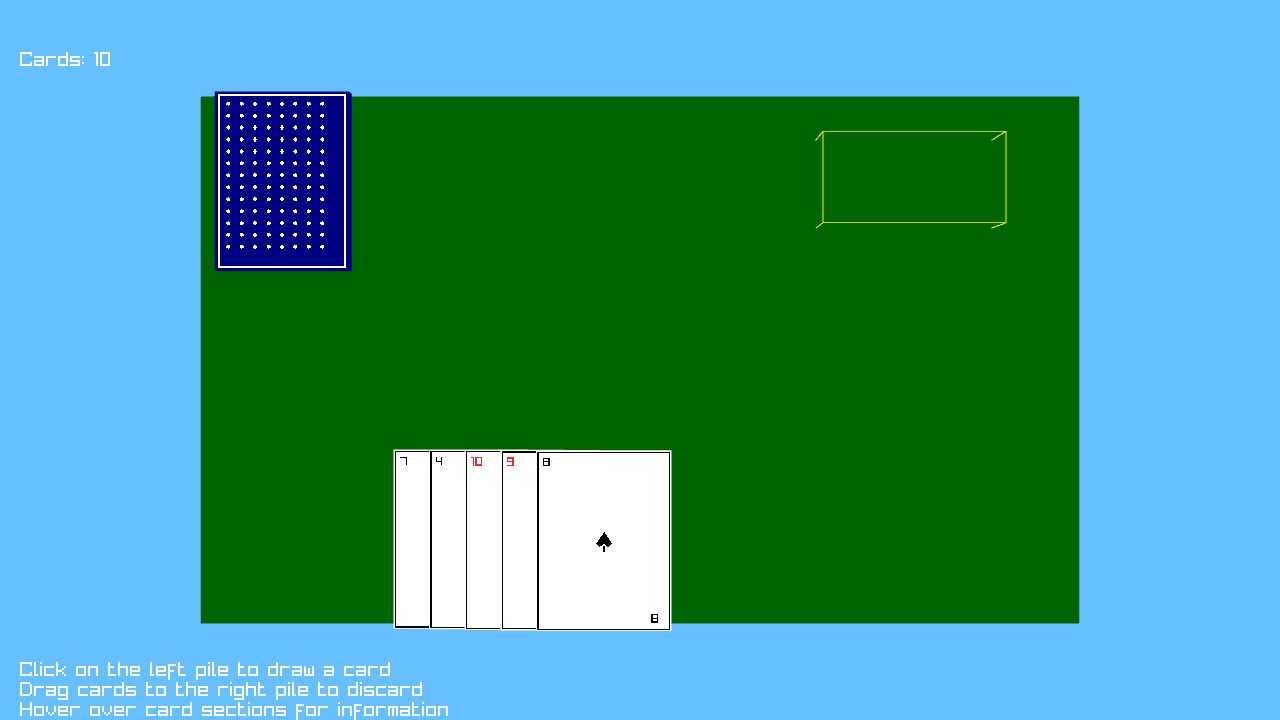
This example demonstrates a 3D card game implementation using the PopcorningGuineaPig Engine's advanced card system. It showcases 3D card rendering, interactive card manipulation, pile management, and complex game mechanics in a three-dimensional environment.
Overview
The Card Game example is located in examples/card-game/ and demonstrates:
- 3D Card System: Full 3D card rendering and interaction
- Card Pile Management: Draw pile, discard pile, and hand management
- Interactive Card Sections: Clickable areas on cards (title, picture, loot)
- Drag-and-Drop Mechanics: 3D mouse interaction with cards
- Procedural Texture Generation: Runtime card texture creation
- Visual Effects: Particle effects for card actions
- 3D Camera System: Perspective camera for card table view
Key Features
1. 3D Card System
Advanced 3D card representation with interactive sections:
// Create a 3D card with front/back textures
Card3D card = new Card3D(
    cardSpecificTexture,    // Front texture
    cardBackTexture,        // Back texture
    Vector3.Zero,           // Initial position
    new Vector2(1.5f, 2.0f), // Card dimensions
    0.05f                   // Card thickness
);

// Add interactive sections to the card
card.AddSection("title", new Rectangle(0.1f, 0.05f, 0.8f, 0.15f));    // Top section
card.AddSection("picture", new Rectangle(0.15f, 0.25f, 0.7f, 0.4f));  // Center section
card.AddSection("loot", new Rectangle(0.1f, 0.75f, 0.8f, 0.2f));      // Bottom section

// Enable nine-slice scaling for card textures
card.SetFrontNineSlice(10);
card.SetBackNineSlice(10);

// Set initial state
card.SetFaceUp(false);
2. Card Pile System
Organized card management with visual stacking:
// Create card piles with 3D positioning
drawPile = new CardPile3D(new Vector3(-4, 0.2f, -2.0f), Vector3.Zero, 0.01f);
discardPile = new CardPile3D(new Vector3(2, 0.2f, 0), Vector3.Zero, 0.01f);

// Add cards to pile with animation
drawPile.AddCard(card, false); // Add without animation
discardPile.AddCard(card, true); // Add with animation

// Shuffle the deck
drawPile.Shuffle();

// Draw cards from pile
Card3D? drawnCard = drawPile.DrawCard(true); // Draw with animation
3. Procedural Texture Generation
Runtime texture creation for cards and table:
// Generate card back texture
cardBackTexture = TextureGenerator.GenerateCardBackTexture(
    200, 300,
    new Color(0, 0, 128, 255) // Blue back
);

// Generate suit-specific textures
foreach (CardSuit suit in Enum.GetValues(typeof(CardSuit)))
{
    suitTextures[suit] = TextureGenerator.GenerateCardFrontTexture(
        200, 300, suit, CardValue.Ace
    );
}

// Generate table texture
tableTexture = TextureGenerator.GenerateTableTexture(1024, 1024);
4. 3D Mouse Interaction
Advanced 3D mouse picking and dragging:
private void HandleMouseInput(float deltaTime)
{
    Vector2 mousePos = Raylib.GetMousePosition();
    string sectionName = string.Empty;

    // Check for card hover with section detection
    if (currentCard != null && currentCard.IsPointOver(mousePos, camera, out sectionName))
    {
        currentCard.SetHighlight(true, Color.Yellow, 1.0f);
        hoveredSection = sectionName;

        // Set contextual tooltip
        switch (sectionName)
        {
            case "title":
                sectionTooltip = "Card Title - Shows the name of this card";
                break;
            case "picture":
                sectionTooltip = "Card Artwork - The main illustration";
                break;
            case "loot":
                sectionTooltip = "Loot Icons - Rewards for playing this card";
                break;
        }
    }

    // Handle card dragging in 3D space
    if (isDragging && currentCard != null)
    {
        Ray ray = Raylib.GetScreenToWorldRay(mousePos, camera);
        Vector3 planeNormal = Vector3.UnitY;
        Vector3 planePoint = new Vector3(0, 0.5f, 0);

        // Calculate intersection with dragging plane
        float denominator = Vector3.Dot(ray.Direction, planeNormal);
        if (Math.Abs(denominator) > 0.0001f)
        {
            float t = Vector3.Dot(planePoint - ray.Position, planeNormal) / denominator;
            if (t >= 0)
            {
                Vector3 intersectionPoint = ray.Position + ray.Direction * t;
                currentCard.SetPosition(new Vector3(intersectionPoint.X, 0.5f, intersectionPoint.Z));
            }
        }
    }
}
5. Card Data Structure
Comprehensive card representation:
public enum CardSuit
{
    Hearts, Diamonds, Clubs, Spades
}

public enum CardValue
{
    Ace = 1, Two = 2, Three = 3, Four = 4, Five = 5, Six = 6, Seven = 7,
    Eight = 8, Nine = 9, Ten = 10, Jack = 11, Queen = 12, King = 13
}

public class CardData
{
    public CardSuit Suit { get; }
    public CardValue Value { get; }

    public CardData(CardSuit suit, CardValue value)
    {
        Suit = suit;
        Value = value;
    }

    public override string ToString() => $"{Value} of {Suit}";
}
6. Deck Creation and Management
Systematic deck initialization:
private void CreateDeck()
{
    for (int i = 0; i < 10; i++)
    {
        // Create card data
        CardSuit suit = (CardSuit)(i % 4);
        CardValue value = (CardValue)((i % 13) + 1);
        CardData cardData = new CardData(suit, value);

        // Generate specific texture for this card
        Texture2D cardSpecificTexture = TextureGenerator.GenerateCardFrontTexture(
            200, 300, suit, value
        );

        // Create 3D card
        Card3D card = new Card3D(
            cardSpecificTexture, cardBackTexture,
            Vector3.Zero, new Vector2(1.5f, 2.0f), 0.05f
        );

        // Configure card sections and properties
        card.AddSection("title", new Rectangle(0.1f, 0.05f, 0.8f, 0.15f));
        card.AddSection("picture", new Rectangle(0.15f, 0.25f, 0.7f, 0.4f));
        card.AddSection("loot", new Rectangle(0.1f, 0.75f, 0.8f, 0.2f));

        card.SetFrontNineSlice(10);
        card.SetBackNineSlice(10);
        card.SetFaceUp(false);

        drawPile.AddCard(card, false);
    }

    drawPile.Shuffle();
}
7. Hand Management
Player hand positioning and interaction:
private void DrawCard()
{
    if (drawPile.GetCardCount() > 0)
    {
        Card3D? card = drawPile.DrawCard(true);
        if (card != null)
        {
            playerHand.Add(card);

            // Calculate hand position
            int cardIndex = playerHand.Count - 1;
            float xPos = -2.0f + cardIndex * 0.4f;  // Spread cards horizontally
            float yPos = 0.3f + cardIndex * 0.02f;  // Slight vertical offset
            float zPos = 2.0f;                      // Towards player

            card.SetPosition(new Vector3(xPos, yPos, zPos));
            card.SetRotation(Vector3.Zero);
            card.SetFaceUp(true); // Show card face when in hand
        }
    }
}
8. Visual Effects System
Particle effects for game actions:
// Initialize particle effect
private ParticleEffect discardEffect = new ParticleEffect();

// Trigger effect when card is discarded
if (discardPile.IsPointOver(mousePos, camera))
{
    discardPile.AddCard(currentCard, true);

    // Trigger visual effect
    discardEffect.Trigger(discardPile.GetPosition(), Color.Gold);

    // Execute callback
    onCardDiscarded?.Invoke(currentCard);

    playerHand.Remove(currentCard);
    currentCard = null;
}
Scene Structure
3D Environment Setup
Creating the card table environment:
public override void Load()
{
    // Initialize 3D camera
    camera = new Camera3D
    {
        Position = new Vector3(0, 10, 0),    // Above the table
        Target = new Vector3(0, 0, 0),       // Looking at table center
        Up = new Vector3(0, 0, -1),          // Up vector
        FovY = 45,                           // Field of view
        Projection = CameraProjection.Perspective
    };

    // Create table model
    tableModel = Raylib.LoadModelFromMesh(Raylib.GenMeshCube(10.0f, 0.2f, 6.0f));

    // Define target area for card play
    targetArea = new BoundingBox(
        new Vector3(2, 0, -2.5f),
        new Vector3(4, 0.5f, -1.5f)
    );
}
Update Loop
Comprehensive game state management:
public override void Update(double deltaTime)
{
    float dt = (float)deltaTime;

    // Update card piles
    drawPile.Update(dt);
    discardPile.Update(dt);

    // Update current card
    currentCard?.Update(dt);

    // Update visual effects
    discardEffect.Update(dt);

    // Handle mouse input
    HandleMouseInput(dt);

    // Update target effect timeout
    if (showTargetEffect)
    {
        Task.Delay(1000).ContinueWith(_ => showTargetEffect = false);
    }
}
3D Rendering
Multi-layer rendering system:
public override void Render(int width, int height)
{
    Raylib.ClearBackground(Color.SkyBlue);

    Raylib.BeginMode3D(camera);

    // Draw environment
    Raylib.DrawModel(tableModel, Vector3.Zero, 1.0f, Color.White);
    Raylib.DrawCube(new Vector3(0, 0.1f, 0), 10.0f, 0.01f, 6.0f, tableColor);

    // Draw game elements
    drawPile.Draw(camera);
    discardPile.Draw(camera);

    // Draw player hand
    foreach (var card in playerHand)
    {
        card.Draw(camera);
    }

    // Draw target area
    Raylib.DrawBoundingBox(targetArea, Color.Yellow);

    // Draw effects
    discardEffect.Draw();

    if (showTargetEffect)
    {
        Vector3 center = targetArea.Min + (targetArea.Max - targetArea.Min) / 2;
        Raylib.DrawCube(center, 2, 0.6f, 2, Color.Gold);
    }

    Raylib.EndMode3D();

    // Draw 2D UI overlay
    DrawUI();
}
Running the Example
Prerequisites
- .NET 10.0 or later
- PopcorningGuineaPig.Engine reference
- Raylib-cs package
Build and Run
cd examples/card-game/CardGame
dotnet build
dotnet run
Project Structure
CardGame/
├── CardGame.csproj          # Project file
├── MyGame.cs                # Game initialization
├── Program.cs               # Entry point
├── CardData.cs              # Card data structures
├── TextureGenerator.cs      # Procedural texture generation
├── ParticleEffect.cs        # Visual effects system
└── scenes/
    └── CardGameScene.cs     # Main game scene
What You'll Learn
- 3D Card Rendering: Creating and managing 3D card objects
- Interactive Sections: Defining clickable areas on 3D objects
- 3D Mouse Picking: Converting 2D mouse coordinates to 3D world space
- Pile Management: Organizing cards in structured collections
- Procedural Generation: Creating textures at runtime
- Drag-and-Drop 3D: Implementing 3D object manipulation
- Camera Systems: Setting up 3D perspective cameras
- Visual Effects: Adding particle effects to game actions
Advanced Techniques
3D-to-2D Projection
Converting world coordinates to screen space:
Vector3 cardScreenPos = PopcorningGuineaPig.Engine.Helpers.RaycastHelper.WorldToScreen(
    currentCard.GetPosition(),
    camera
);
Plane Intersection for Dragging
Mathematical 3D plane intersection:
Ray ray = Raylib.GetScreenToWorldRay(mousePos, camera);
Vector3 planeNormal = Vector3.UnitY;
Vector3 planePoint = new Vector3(0, 0.5f, 0);

float denominator = Vector3.Dot(ray.Direction, planeNormal);
if (Math.Abs(denominator) > 0.0001f)
{
    float t = Vector3.Dot(planePoint - ray.Position, planeNormal) / denominator;
    if (t >= 0)
    {
        Vector3 intersectionPoint = ray.Position + ray.Direction * t;
        currentCard.SetPosition(new Vector3(intersectionPoint.X, 0.5f, intersectionPoint.Z));
    }
}
Contextual Tooltips
Dynamic tooltip system based on interaction:
// Set tooltip based on hovered section
switch (sectionName)
{
    case "title":
        sectionTooltip = "Card Title - Shows the name of this card";
        break;
    case "picture":
        sectionTooltip = "Card Artwork - The main illustration";
        break;
    case "loot":
        sectionTooltip = "Loot Icons - Rewards for playing this card";
        break;
    default:
        sectionTooltip = "Card - Drag to discard pile or click to flip";
        break;
}
Event-Driven Architecture
Delegate-based game events:
private Action<Card3D>? onCardDiscarded;

// Set up event handler
onCardDiscarded = (card) => {
    cardsRemaining = drawPile.GetCardCount();
    Console.WriteLine($"Card discarded! Cards remaining: {cardsRemaining}");

    if (drawPile.GetCardCount() == 0)
    {
        Console.WriteLine("Game over! All cards have been discarded.");
    }
};
Game Mechanics
Target Area System
Defined zones for card play:
// Define target area
targetArea = new BoundingBox(new Vector3(2, 0, -2.5f), new Vector3(4, 0.5f, -1.5f));

// Check if card is played to target
if (currentCard != null && IsPointInBoundingBox(currentCard.GetPosition(), targetArea))
{
    Console.WriteLine("Card played to target area!");
    showTargetEffect = true;

    discardPile.AddCard(currentCard, true);
    playerHand.Remove(currentCard);
    currentCard = null;
}
Hand Positioning Algorithm
Automatic hand layout:
// Calculate position for card in hand
int cardIndex = playerHand.Count - 1;
float xPos = -2.0f + cardIndex * 0.4f;      // Horizontal spread
float yPos = 0.3f + cardIndex * 0.02f;       // Slight elevation
float zPos = 2.0f;                           // Towards player

card.SetPosition(new Vector3(xPos, yPos, zPos));
Performance Considerations
- Texture Reuse: Share textures between similar cards
- LOD System: Use simpler models for distant cards
- Culling: Don't render cards outside camera view
- Batch Rendering: Group similar cards for efficient rendering
- Memory Management: Properly dispose of textures and models
Related Documentation
- Card System - Detailed card system implementation
- 3D Scenes - 3D scene management
- UI Components - UI element integration
- Game Architecture - Scene and game structure
Next Steps
After exploring this example, consider:
- Card Game Logic: Implement specific game rules (poker, solitaire, etc.)
- Multiplayer Support: Add network multiplayer capabilities
- Advanced Effects: Implement card flipping animations and transitions
- AI Opponents: Create computer players with game AI
- Custom Card Types: Design specialized card mechanics
- Save System: Implement game state persistence
This example demonstrates the engine's capability for complex 3D interactive systems, providing a foundation for sophisticated card-based games and similar interactive 3D applications.